Build a CENDORYA-style presentation
Work backward from a finished 22-page cardiovascular atlas. Use one detailed prompt, download an editable draft and learn how to refine the story, science and evidence.
Start with the finished experience#
CENDORYA is one of the four fictional presentations on CLM Studio’s homepage. Its 22-page atlas moves from a cinematic opening to anatomy, evidence and a considered recap. It is a useful reference when a linear slide deck cannot give every conversation the depth it needs.
Explore the finished presentation
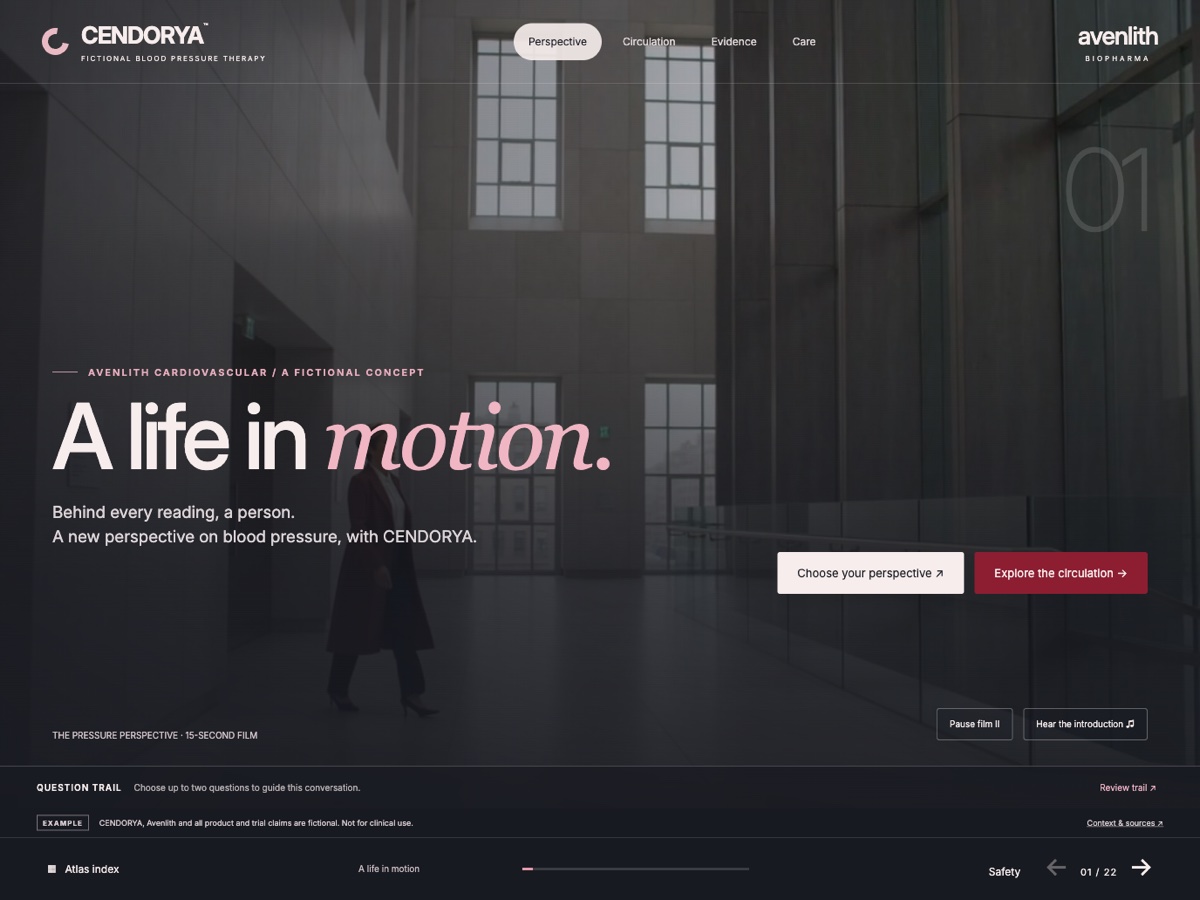
The live showcase is a separately authored reference. The walkthrough below gives Studio its story and visual brief in one prompt, then takes you through the review and refinement of your own first draft. Generated results vary.
All Avenlith brands, therapies, people and clinical claims here are fictional. The charts use simulated data and the anatomy is an educational illustration.
Understand what makes it feel complete#
| Design decision | Why use it | What to inspect |
|---|---|---|
| One question per slide | The reader knows why the page exists. | A headline, one focal visual and a clear next step. |
| A short route with deeper views | The conversation can change depth without losing its thread. | Visible chapter choices and a reliable return. |
| One dataset, several representations | Readers can compare the picture with exact values. | Consistent units, population, comparator and time. |
| Progressive science | Complex anatomy becomes easier to explain. | A useful still view before optional motion. |
| Deliberate question review | The ending reflects what was discussed. | Explicit discussed or unresolved choices. |
Download the working draft#
Make this your starting point
Download the complete kit, or choose a single file. The Markdown file creates editable text slides; the prompt supplies the creative direction.
Download starter kit (.zip)Keep an untouched copy of the kit. Duplicate it for your own brand and replace the invented source content with material your team has reviewed before using a real project.
Create the first draft with one prompt#
- Open Create and choose Starting point → AI.
- Open Project details. Name the project CENDORYA — creative study, set Brand to Avenlith Biopharma and choose the appropriate audience, language and CLM context.
- Copy the complete prompt below into Content request. It includes the story, design system, interaction intent, synthetic numbers and review rules.
- Choose Generate when available. If the action is Save draft, the request is stored for later; no generation has completed.
- Review the proposal and its slide structure before accepting. Confirm that all 22 topics and the fictional-content notice are present.
Read the complete master prompt
Create a 22-slide interactive CLM presentation for fictional Avenlith Biopharma and its fictional CENDORYA therapy. Title: A life in motion. This is a creative training example, not medical information.

AUDIENCE AND JOB
Support a concise professional discussion that can move from the person to circulation, then to evidence and its limits. Make the short route useful on its own, with optional deeper exploration. Write clear finished draft copy rather than filling slides with instructions. Use no real pharmaceutical company, product or patient names.

CREATIVE DIRECTION
Use a sophisticated editorial system: pearl backgrounds, charcoal type, crimson accents, generous negative space, large readable headlines and a consistent navigation bar. Keep the opening cinematic, the science visual and the evidence precise. Use a 16:9 canvas. Compose each slide around one primary question. Do not apply one repetitive card layout to every page.

IMAGERY AND MEDIA
Propose an architectural opening still or short muted film with an intentional poster. Ask for a refined three-dimensional circulation or artery illustration. Include a labeled static equivalent and a concise anatomical explanation. Give video a deliberate playback policy on leaving and returning. Keep narration optional and provide a transcript. Music should support the opening and remain low beneath speech. Use purposeful motion to reveal hierarchy; provide an understandable reduced-motion state.

STORY AND INTERACTION
Create the following 22 slides. Use the section descriptions as the creative brief, not as text to copy verbatim onto the slides. Preserve their evidence and qualifications. Use visible, readable route choices. Keep the outcome on returning from a deeper view predictable.

1. A life in motion
Open with the person behind the blood-pressure reading. Introduce CENDORYA, a fictional Avenlith Biopharma therapy, with a calm architectural image, a restrained crimson accent and a choice to explore the story or circulation.

2. Start with a question
Offer three discussion questions: how the circulation works, what the synthetic study measured, and what remains uncertain. Invite a deliberate choice of up to two questions; never infer that visiting a slide answers a question.

3. The person behind the reading
Use a fictional adult persona and one concise everyday observation. Avoid medical advice or an implied treatment recommendation. Give the discussion room to move toward science or evidence.

4. Read the pressure
Explain systolic and diastolic measurements using clearly labeled schematic information. Keep units visible. Explain that the invented trial endpoint measures a group mean change.

5. The circulation atlas
Plan an illustrative circulation scene with distinct heart, artery and vessel-wall views. Pair each visual with a readable text explanation. Supply a static view for readers who cannot use the interactive scene.

6. Inside the artery
Reveal the vessel wall in two or three labeled stages. Keep explanatory copy beside the anatomical region. Treat the anatomy as a simplified educational illustration.

7. Science Bridge
Separate schematic physiology, the invented treatment mechanism, and the synthetic measured endpoint into distinct steps. Do not imply the trial proves every causal connection.

8. A closer perspective
Use a generous illustration and a short discussion question to connect the story to the evidence. Keep the clinical conclusion open until the study design and limitations have been shown.

9. The product concept
Introduce the fictional CENDORYA 5 mg concept. State that no real prescribing information exists. Do not present use, dose or suitability as clinical guidance.

10. Inside AXIS-1
Show the invented randomized, double-blind, placebo-controlled, parallel-group, eight-week study. Randomized: 300 per arm. Full analysis: 292 per arm. Safety: 300 per arm. Keep these populations separate.

11. Evidence Lens / pressure
Week eight mean seated systolic pressure change: CENDORYA −14.2 mmHg; placebo −7.1 mmHg. Difference −7.1 mmHg, synthetic 95% interval −9.2 to −5.0. Plan chart, exact values, difference/interval and source views from the same dataset. The result does not establish cardiovascular outcomes, individual response or durability beyond eight weeks.

12. Evidence Lens / response
Exploratory threshold endpoint: at least 10 mmHg reduction at week eight. CENDORYA: 164/292 (56.2%). Placebo: 120/292 (41.1%). Plan percentage, exact count and aggregate proportion views. Do not imply a supplied multiplicity-adjusted inference or a clinical treatment target.

13. Trial Boundary Explorer
Separate eligibility, baseline representation, subgroup evidence and unknown information. Provide finite fictional discussion scenarios. Do not calculate suitability or make a recommendation.

14. Challenge Mode
Offer fixed discussion questions about comparator, measurement, uncertainty, population and follow-up. Each choice should reveal the relevant existing evidence and its limit. Keep the trial result fixed.

15. Time Window
Show only observation times supplied in the fictional dossier. Keep efficacy, safety, discontinuation and follow-up in separate lanes. Leave unavailable observations empty; do not interpolate or invent week-twelve results.

16. Safety in view
Synthetic safety population: 300 per arm. Any treatment-emergent adverse event: 64 vs 49. Dizziness: 18 vs 10. Headache: 13 vs 12. Low blood pressure: 9 vs 3. Serious events: 2 vs 2. State that all counts are invented demonstration values.

17. Who completed the study?
Show all-cause discontinuation: 18/300 vs 15/300. Keep randomized, full-analysis and safety denominators visible. Do not silently substitute the 292-per-arm efficacy population.

18. The measurement matters
Revisit the continuous versus threshold endpoints and the eight-week window. Explain what the synthetic values establish within the example and what they cannot answer.

19. Question Trail / review
Return to the selected questions. Let the reader deliberately mark each discussed or unresolved. Do not count a page visit as an answer, or imply persistent CRM tracking.

20. Evidence Receipt
Plan a local text recap of the evidence views inspected, selected questions, discussed/unresolved state, qualifications and source. Make downloading explicit. Do not imply email delivery or persistent clinical records.

21. Context & sources
Identify Avenlith synthetic study dossier, AXIS-1 v1.0, tables 1–5, as invented for demonstration. Include clear limits, an anatomy explanation and the fictional-content notice.

22. The next conversation
Close on one clear discussion action. Keep a return to the atlas and source context available. Retain the fictional-content notice and avoid a clinical call to action.

EVIDENCE RULES
All numbers are synthetic and must stay labeled as invented demonstration data. Reuse the same values across charts, tables, tooltips and narrative. Keep endpoint, unit, comparator, population, denominator and time window together. Do not invent a result, interpolate a missing observation, infer individual outcomes from group means, or turn exploratory numbers into a treatment recommendation. Preserve uncertainty and source context in every evidence view.

DRAFT DELIVERY AND REVIEW
Create a coherent editable first draft. Keep editable text separate from images where supported. Name reusable groups and components clearly. Build source, menu and back controls consistently. Keep all media and interactions understandable without animation or audio. Where a requested interaction needs further authoring, make the follow-up explicit in the draft instead of presenting a decorative control as working. Keep the fictional-content notice visible. Return a concise slide outline, a list of generated or required assets, the draft interaction structure and a review checklist. I will inspect the generated proposal and preview before accepting it.
A strong single prompt carries the same information a creative team would need. It establishes the intended result, the visual language, the source constraints and the behavior to check. It starts the draft; review and refinement complete the presentation.
Use the editable draft as a second starting point#
- Download cendorya-editable-draft.md.
- Open Create → Starting point → Import.
- Choose Import Markdown slides (.md) and select the file.
- Confirm the filename, then choose Create imported presentation.
- Review the 22 editable headings and audience-facing draft text. Use the master prompt as your design brief while you refine the pages.
Markdown import creates editable text slides. The download supplies usable narrative and synthetic evidence copy. Add your layouts, imagery, media, charts and interactions in Studio; those visual elements and the separately authored showcase code are not part of the Markdown file.
Refine one slide without unsettling the deck#
Start with the opening. Choose This page in the request options and describe both the change and what must stay. A precise local request lets you improve a treatment while preserving the accepted story.
On this page, give the opening a sophisticated editorial treatment: pearl and charcoal, one crimson accent, a large “A life in motion” headline and an architectural image with room for the title. Preserve CENDORYA, Avenlith Biopharma, the fictional-content notice and the two route choices. Do not change any other slide. Show me the proposal for review.
Inspect the before and proposed after, then preview. Keep only a change you can explain. The complete slide-update guide covers selected objects, allowed changes, comparison, recovery and prompt patterns.
Build depth into the science#
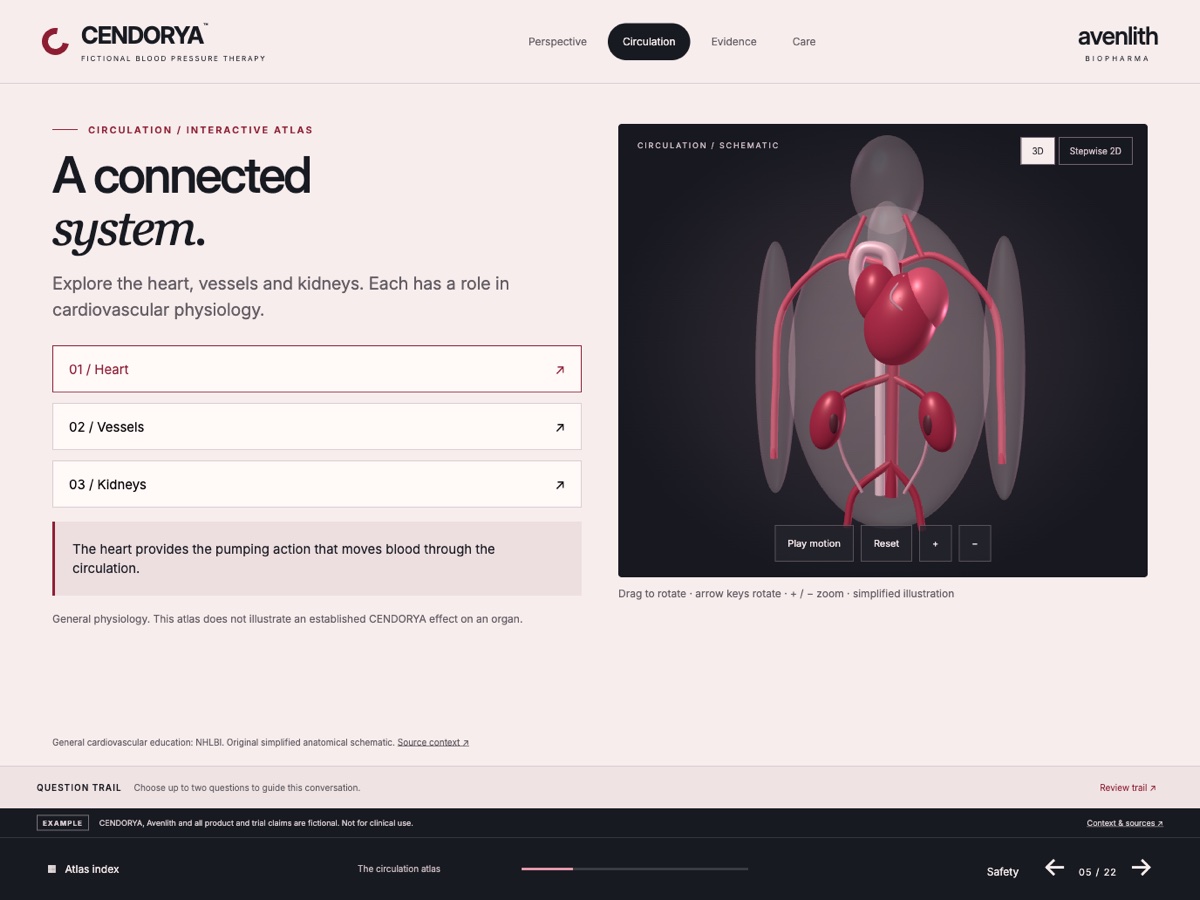
Begin with an understandable still view. Ask for a three-dimensional illustration with a useful camera angle and a clear focal area. Add a short explanation before adding exploratory controls. For an interactive scene, check the camera, reset behavior, hotspots and text equivalent separately.
Use 3D imagery and interactive objects for a prompt-first walkthrough. The source-rendered scene controls and model workflow show where the visual becomes an interactive object. Never rely on a moving view to carry essential meaning.
Give the evidence more than one useful view#
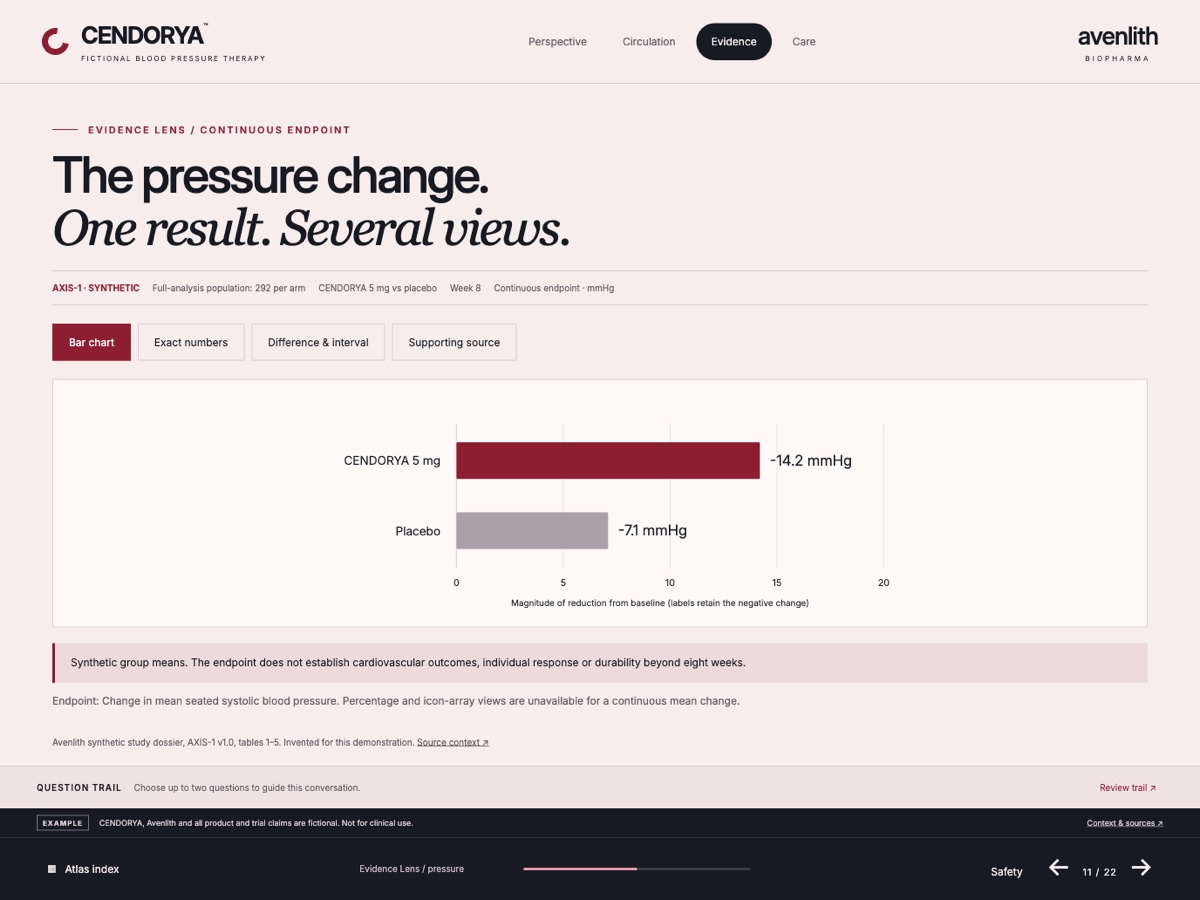
Study slide 11 in the finished example. The chart, exact numbers and interval view all describe the same endpoint. Keep the population, denominator, comparator, units and eight-week window in view when changing the representation.
- Prepare the data before asking for a visual treatment.
- Define the one question the reader needs to answer.
- Choose a primary chart and a complementary exact-value view.
- Keep the source and qualification accessible from both.
- Compare every representation against the same dossier values.
The advanced evidence guide explains the design choices and the verification steps.
Direct the video, voice and music#
The opening needs atmosphere; the scientific explanation needs attention. Give each media layer a specific job. Choose a still poster that works before play, keep narration optional and let the music sit beneath the voice.
- Write the narration for the visible message on that page.
- Generate or add the clip with a defined composition and duration.
- Place the asset and set its poster, trim and playback behavior.
- Add narration, then music, and inspect their separate levels.
- Rehearse entering, leaving and returning to the slide. Test with sound off as well as on.
Follow the complete video workflow, music and narration, and the motion timeline for illustrated control-by-control instructions.
Check the complete experience#
- Story: the short route makes sense and deeper views return to a known place.
- Copy: every page has a purpose, with readable headings and no authoring instructions left in the presentation.
- Evidence: charts, tables and narrative match the same synthetic dossier.
- Media: posters, captions or transcripts, sound levels and page-return behavior work as intended.
- Motion and 3D: the still or reduced-motion experience remains understandable; controls can be reached and reset.
- Interaction: every visible choice does something meaningful; visited pages do not silently become answered questions.
- Review: inspect the actual accepted revision and preview. Preparing a package is separate from Veeva upload, content approval and target-client validation.
Use the workspace visual guide to find the controls and review and handoff to prepare the next step.